
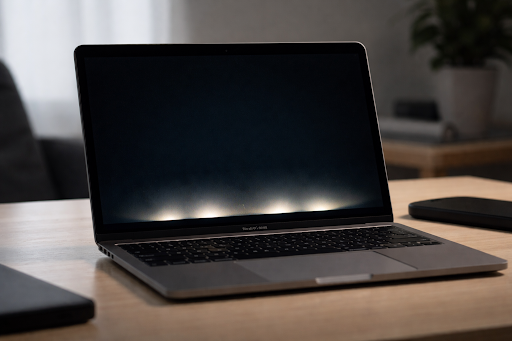
The macbook pro 2016 flexgate issue is one of the most widely discussed hardware problems associated with the MacBook Pro (2016). If your screen shows uneven lighting at the bottom or turns black when you adjust the lid, you may be dealing with this well-known display defect.
This article explains what Flexgate is, why it happens, which models are affected, repair options, costs, and whether fixing it still makes sense today. Everything is written in clear, simple language so you can easily understand the issue and decide what to do next.
What Is MacBook Pro 2016 Flexgate?
Flexgate is a display backlight failure caused by a fragile internal cable inside certain 2016 MacBook Pro models. The issue became widely reported a few years after release, when users began noticing strange lighting patterns at the bottom of their screens.
The problem is linked to a thin flex cable that connects the display to the logic board. Over time, the cable can wear out due to repeated opening and closing of the laptop lid.
Unlike accidental damage, Flexgate is considered a design-related wear issue.
Why Does Flexgate Happen?
To understand Flexgate, it helps to look at what changed in the 2016 redesign.
When Apple Inc. launched the redesigned MacBook Pro lineup in 2016, the company made the device thinner and lighter. To achieve this slim design, Apple used a shorter and more tightly wrapped display cable.
Shorter Display Cable Design
The flex cable is wrapped around the hinge area. Because it is shorter than previous designs, it experiences more tension when the lid opens.
Over time, this constant bending can weaken the cable.
Repeated Hinge Movement
Every time you open and close your laptop, the cable bends. After hundreds or thousands of cycles, the internal wiring may begin to fail.
Wear and Tear Over Time
The issue does not usually appear immediately. Many users reported problems after one to three years of regular use.
This gradual failure is why the issue gained attention well after release.
Common Symptoms of Flexgate
Flexgate typically starts with subtle display changes. These signs may become worse over time.
Stage Light Effect
The most common symptom is the “stage light” effect. You will see bright spots at the bottom of the screen that look like stage lights shining upward.
This is easiest to notice on dark backgrounds.
Uneven Backlighting
The screen may appear brighter at the bottom and darker at the top.
Screen Goes Black at Certain Angles
Some users notice the display works fine at small angles but turns black when opened beyond 40 to 60 degrees.
Flickering Display
In more advanced cases, the screen may flicker or lose backlight completely.
If your MacBook shows these symptoms, there is a strong chance it is related to macbook pro 2016 flexgate.
Which Models Are Affected?
Flexgate mainly affects certain 13-inch models from 2016. The issue is most commonly reported in:
MacBook Pro (13-inch, 2016)
The MacBook Pro (13-inch, 2016) with and without Touch Bar has been the primary model associated with this defect.
Some early 2017 13-inch models also experienced similar issues.
The 15-inch 2016 MacBook Pro models were reported less frequently, though some users still experienced display problems.
Apple’s Repair Program
After widespread reports, Apple Inc. launched a repair program in 2019 for specific 13-inch MacBook Pro models manufactured in 2016.
What the Program Covered
Apple offered free display replacements for eligible 13-inch models experiencing backlight failure.
Time Limitations
The program covered devices for up to four years from the original purchase date.
Because the 2016 models are now older, most devices are no longer eligible under the free repair program.
However, it is still worth checking Apple’s official support website using your serial number to confirm eligibility.
How Much Does It Cost to Fix Flexgate?
If your device is no longer covered, repair costs can be significant.
Apple Official Repair
Apple typically replaces the entire display assembly. The cost can range from $500 to $700 depending on your region.
Third-Party Repair Shops
Independent repair shops may charge between $250 and $400. Some specialized technicians can replace only the flex cable, which reduces cost.
However, quality varies depending on the repair provider.
DIY Repair
While possible, this repair is complex. It requires advanced tools and technical experience. The display assembly is delicate, and mistakes can cause permanent damage.
For most users, professional repair is the safer option.
How to Confirm If You Have Flexgate
You can perform a simple test at home.
First, set your screen brightness to maximum.
Next, open a dark background image.
Slowly adjust the screen angle.
If you notice the backlight changes, stage lighting appears, or the screen turns black at certain angles, it likely indicates macbook pro 2016 flexgate.
If the issue happens consistently, it is not a software problem.
Is Flexgate a Software Issue?
No. Flexgate is a hardware problem.
Updating macOS or resetting system settings will not fix the issue because the root cause is a physically damaged cable inside the display assembly.
If your display problem changes based on screen angle, it is almost certainly hardware-related.
Is It Worth Repairing in 2026?
This depends on several factors.
Consider the Repair Cost
If the repair costs more than half the value of the laptop, upgrading may make more sense.
Consider Overall Condition
Check battery health, storage size, and performance. If the laptop is still fast and reliable, repairing it might extend its life by several years.
Consider Resale Value
A MacBook with display issues has very low resale value. Repairing it may increase its worth if you plan to sell.
For many users, the decision comes down to budget and how much longer they plan to use the device.
How to Prevent Further Damage
If your screen shows early signs but is still usable, you can slow the progression.
Avoid opening the lid beyond 90 degrees.
Use moderate brightness levels.
Consider connecting to an external monitor when possible.
Most importantly, back up your data regularly.
Flexgate tends to worsen over time, and complete backlight failure can happen unexpectedly.
Final Thoughts
The macbook pro 2016 flexgate issue highlights the risks of ultra-thin hardware design. While the 2016 MacBook Pro introduced a sleek and modern look, the shorter display cable created long-term durability concerns for some users.